Home energy
How to track your home energy use: meters, monitors, apps and a first-week plan
You can see where your electricity and gas go with tools you probably already have. Here is how each option works, what it costs and how to turn the numbers into kWh, money and CO₂.
The quick answer: four ways to track home energy
To track your home energy use, start with what you already have: the kWh on your bills and the readings on your meter. If you have a smart meter, switch on your supplier’s app or download your hourly data. Then add a whole-home monitor for live readings, or smart plugs to measure individual devices.
Once you have the numbers, two calculations make them useful: your baseload (what the house draws when nothing is in use) and your CO₂ (kWh multiplied by your grid’s carbon intensity). The rest of this guide shows how to do both, and finishes with a seven-day checklist.
| Method | What it shows | Cost | Best for |
|---|---|---|---|
| Bills and manual meter readings | Monthly or daily kWh | Free | Seasonal patterns, checking estimated bills |
| Smart meter app or in-home display | Daily, hourly or half-hourly kWh and cost | Free if installed | Baseload, peaks, tariff choice |
| Whole-home clamp monitor | Live total watts, sometimes solar and circuits | Low to medium | Seeing the effect of switching things on and off |
| Smart panel | Live use per circuit | High | Renovations, solar and battery homes |
| Smart plugs and plug-in meters | One plug-in device at a time | Low | Finding standby and appliance hogs |
Step 1: read your bills and meter
Your bill shows how many kilowatt-hours (kWh) you used, which is the unit that matters for both cost and CO₂. Collect the last 12 months if you can, because heating and cooling make use swing a lot between seasons. For reference, the average US home used about 865 kWh of electricity a month in 2024, according to the EIA.
For daily detail without a smart meter, read the meter at the same time each morning for a week and subtract. Electricity meters show kWh directly. Gas meters usually show cubic metres or cubic feet; your bill shows the factor your supplier uses to convert that volume into kWh.
Step 2: use smart meter data and in-home displays
Smart meters send readings automatically and often come with an in-home display (IHD) that shows live use and cost. They are now common. In Great Britain, there were about 42 million smart and advanced meters in homes and small businesses by June 2026, 72% of all meters (DESNZ). In the US, utilities had about 119 million advanced meters in 2022, around 72% of electricity meters (EIA).
- Check your supplier’s app or account. Most show daily and hourly charts. Some show half-hourly data, which is fine-grained enough to see the kettle, oven or shower.
- Download the data. Many US utilities offer Green Button “Download My Data”, a standard file with 15-minute, hourly, daily or monthly readings (DOE). “Connect My Data” lets you share it with an app you choose.
- Use the in-home display. Leave it somewhere you will see it, such as the kitchen. Its main value is the instant feedback when you switch something on.
If your smart meter is not sending readings, ask your supplier to fix it before you invest in other hardware.
Step 3: add a monitor for live or device-level detail
Whole-home monitors (clamp sensors)
A clamp monitor uses current transformer (CT) sensors that clip around the main supply cable, or around individual circuits, and send live readings to an app. They show your total power in watts second by second, which makes it easy to see what a heater, oven or pump really draws. Some models also measure solar generation and battery charging.
Some apps try to identify individual appliances from their electrical signatures. Accuracy varies, so treat appliance breakdowns as estimates. In many countries, sensors fitted inside a consumer unit or breaker panel should be installed by a qualified electrician.
Smart panels
A smart electrical panel replaces your breaker panel and measures every circuit, and can switch some of them remotely. It is the most detailed option and the most expensive. It makes most sense when you are already rewiring or adding solar, a battery, a heat pump or an EV charger.
Smart plugs and plug-in meters
A plug-in energy meter or smart plug sits between the socket and one device and reports its watts and kWh. It is the cheapest way to find which plug-in devices waste the most. It cannot measure hard-wired loads such as an electric oven, a water heater or a heat pump.
If you do not have a meter, estimate instead: the DOE’s method is watts × hours used per day ÷ 1,000 = kWh per day. A 1,000 W heater run for four hours uses 4 kWh.
Step 4: find your baseload
Your baseload is the electricity your home uses when nobody is doing anything: fridges, routers, alarm systems, chargers and devices on standby. It runs 8,760 hours a year, so small numbers add up. An NRDC study of 70,000 northern California homes found that always-on load from inactive devices averaged about 164 W, about 23% of household electricity.
- Pick a night when the heating, hot water and dishwasher are not running.
- Before bed, read the meter or note the live reading on your display or app. Read it again first thing in the morning.
- Divide the kWh used by the number of hours. 1.2 kWh over 8 hours is 0.15 kW, or 150 W.
- Multiply by 8,760 to get the yearly cost: 150 W is about 1,300 kWh a year.
- With a smart meter, simply look for the lowest hourly or half-hourly reading on a typical night.
Then switch circuits or devices off one at a time while watching the live reading. Old second fridges, games consoles left in rest mode, aquariums, dehumidifiers and desktop computers are common surprises. Our guide to saving energy at home lists what to do about them.
Step 5: convert kWh into CO₂
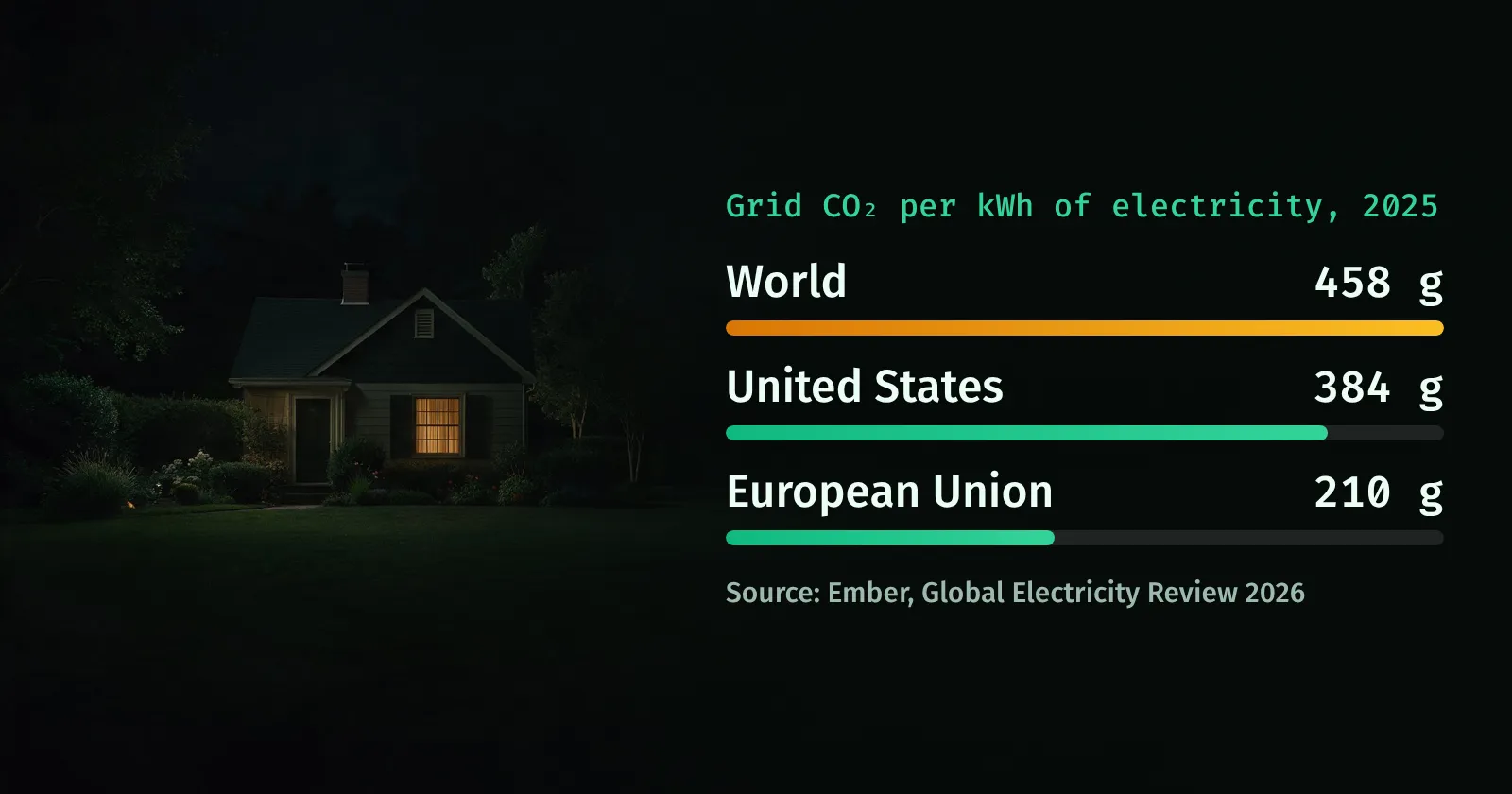
To turn electricity into emissions, multiply kWh by the carbon intensity of your grid. Intensity depends on how much coal, gas, nuclear and renewables your country uses, so the same kWh can mean three times more CO₂ in one country than in another.
| Grid | g CO₂ per kWh | CO₂ from 1,000 kWh (kg) |
|---|---|---|
| European Union | 210 | 210 |
| United States | 384 | 384 |
| World average | 458 | 458 |
| China | 525 | 525 |
| India | 670 | 670 |
Worked example: an average US home using 865 kWh a month uses about 10,400 kWh a year. At 384 g per kWh that is about 4.0 tonnes of CO₂ from electricity alone. See how your country compares on our CO₂ emissions by country ranking, or the United States emissions page.
For gas, multiply the kWh on your bill by about 0.18 kg CO₂e (UK DESNZ conversion factor). A home burning 12,000 kWh of gas a year emits about 2.2 tonnes.
What tracking actually saves
Data on its own does not cut energy use; what you do with it does. An ACEEE meta-review of 36 feedback programmes found that they reduced household electricity use by about 4-12% on average, and it concluded that advanced meters alone are neither necessary nor sufficient to change behaviour.
Large-scale smart meter rollouts show smaller average effects. The UK government’s Smart Metering Early Learning Project found that smart-type meters with in-home displays cut electricity use by about 2.3% and gas use by 1.5% a year compared with traditional meters. The households that save most are the ones that use the data to change heating settings, switch off idle loads and plan upgrades.
Your first week of energy tracking: a checklist
- Day 1: Find your electricity and gas meters, photograph the readings and gather 12 months of bills. Note your yearly kWh.
- Day 2: Set up your supplier’s app or online account, or request a smart meter. Download your interval data if it is available.
- Day 3: Measure your overnight baseload and work out its yearly kWh and cost.
- Day 4: Go round the house with a plug-in meter or smart plug: TV corner, office, kitchen counter and any second fridge or freezer.
- Day 5: Check heating and hot water: thermostat setting, schedule, boiler flow temperature and hot-water timer.
- Day 6: Convert your yearly kWh into CO₂ using your country’s grid intensity, and add gas if you use it.
- Day 7: Pick three changes, write down your baseline and set a reminder to compare next month.
To put your home energy in context with travel, food and shopping, try the steps in our carbon footprint calculator guide. And for the global picture, the live CO₂ counter shows emissions adding up second by second.
Questions and answers
How can I see how much electricity I use at home?
Look at the kWh figures on your last 12 bills, then read your meter at the same time each day for a week. If you have a smart meter, your supplier’s app or website usually shows daily, hourly or half-hourly use, and many US utilities let you download it with Green Button.
Are home energy monitors worth it?
They are worth it if you will look at the data and act on it. Feedback programmes reviewed by ACEEE cut electricity use by about 4-12% on average. If you already have a smart meter with an app, try that first, since it is free; add a clamp monitor or smart plugs when you want live or device-level detail.
How do I convert kWh to CO₂?
Multiply your kWh by your grid’s carbon intensity. At the 2025 US average of 384 g CO₂ per kWh, 1,000 kWh is about 384 kg CO₂. For gas, multiply kWh of gas by about 0.18 kg CO₂e. Our CO₂ emissions by country pages show how grids compare.
What is a normal baseload for a house?
There is no single normal value, but an NRDC study of 70,000 northern California homes found always-on idle loads averaged about 164 W, or about 23% of electricity use. If your overnight reading is well above 150-200 W with no heating or hot water running, there is probably something worth switching off.
Do smart meters save energy on their own?
Only modestly. A UK government trial found that smart-type meters with in-home displays cut electricity use by about 2.3% and gas by 1.5% a year. Bigger savings come from using the data to change settings, fix waste and upgrade equipment.
Sources
- Today in Energy: US residential electricity use averaged 865 kWh per customer per month in 2024, US EIA, 2025
- How many smart meters are installed in the United States?, US EIA FAQ
- Smart meters in Great Britain, quarterly update June 2026, UK DESNZ, 2026
- Green Button, US Department of Energy
- Estimating appliance and home electronic energy use, US DOE Energy Saver
- Home idle load: devices wasting huge amounts of electricity when not in active use, NRDC, 2015
- Global Electricity Review 2026 (carbon intensity by country, 2025), Ember, 2026
- Greenhouse gas reporting: conversion factors (natural gas ~0.18 kg CO₂e/kWh), UK DESNZ
- Advanced metering initiatives and residential feedback programs: a meta-review, ACEEE, 2010
- Smart Metering Early Learning Project: domestic energy consumption analysis, DECC, 2015